
01 / CAPTURE
Found it? Shelf it.
Save selected text with Share → Shelf, paste in the app, or use the keyboard’s paste control. Likely credentials get a warning.
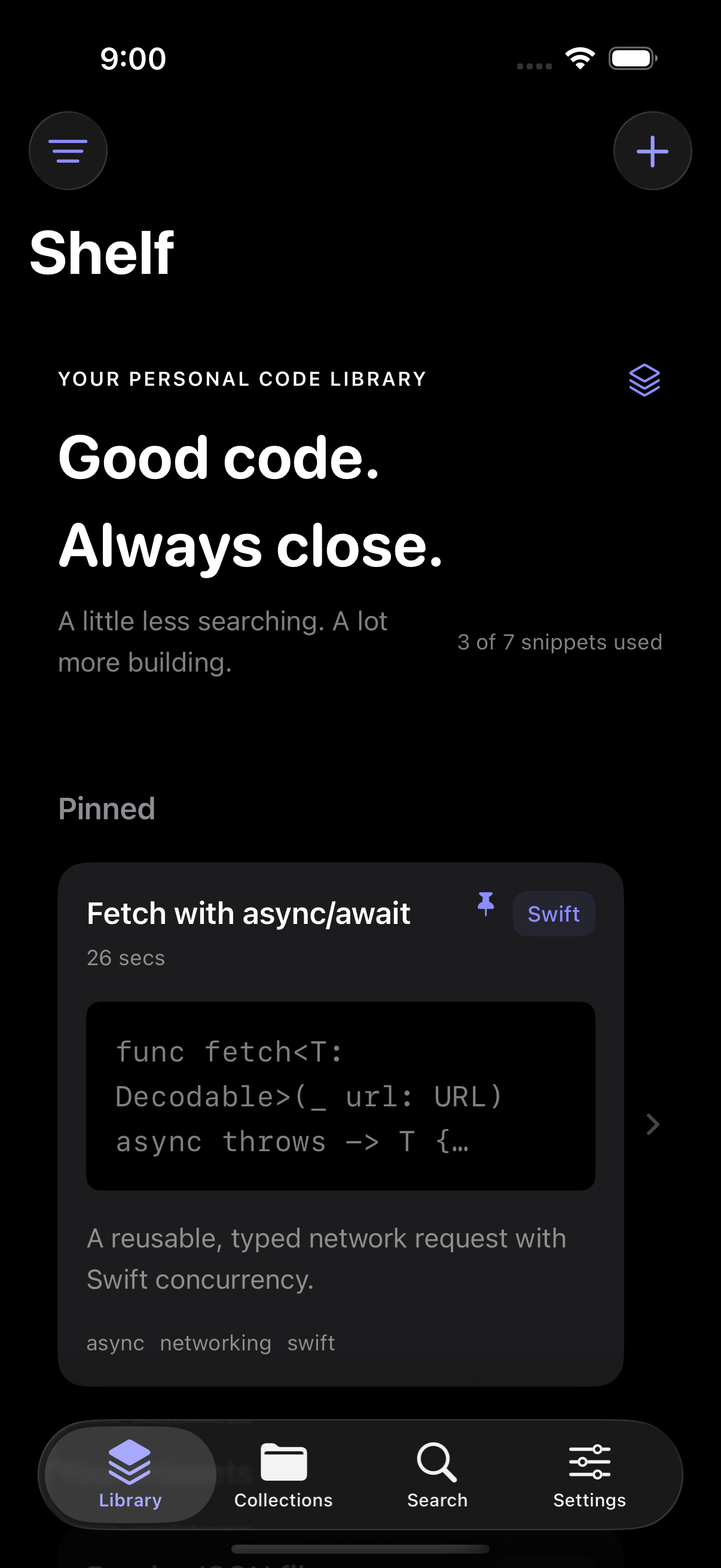
YOUR PERSONAL CODE LIBRARY
That little function. That perfect query.
Give your useful code a home on iPhone and iPad, and bring it back with a tap.
Coming to the App Store· iOS 18 & later
const debounce = (fn, ms) => {
  let timeout;
  return (...args) => {
    clearTimeout(timeout);
    timeout = setTimeout(
      () => fn(...args), ms
    );
  };
};A PLACE FOR THE CODE YOU KEEP
Your best snippets deserve more than a forgotten note.
Save once. Find fast. Keep building.
Save selected text with Share → Shelf, paste in the app, or use the keyboard’s paste control. Likely credentials get a warning.
Make collections, add labels, and pin your favorites. Search by the details that make sense to you.
Switch to the Shelf keyboard, find a snippet, and tap to insert. Fill placeholders without losing your place.
LESS SWITCHING. MORE SHIPPING.
The snippet you need, in the app you’re already using. Browse, search, fill placeholders, and insert with a tap.
Full Access is needed for the shared local library. Some apps and secure fields use the system keyboard.
// Something worth keeping.
func greet(_ name: String) -> String {
    return "Hello, \(name)!"
}Three little examples. One less trip to your notes.
SMALL DETAILS. BIG DIFFERENCE.
Get editable summaries and label suggestions without sending code to an external AI provider. No usage quota.
Apple Intelligence on eligible devices with iOS 26+. Editable offline Basic suggestions everywhere else.
Work offline. Let your private iCloud database keep your Shelf in step when you’re connected. Sync is included on Free.
All six syntax themes, custom accents, and your own code-card watermark. Free includes two themes.
Full version history and smart collections help your library grow with you. Pin non-private snippets to a Home Screen widget.
Protect private snippets with device-owner authentication. Private content stays out of widgets and Spotlight.
The vault is an access lock; it does not add a separately encrypted database.
YOUR CODE. YOUR BUSINESS.
Your snippets live on your device and in your private iCloud database. Shelf has no developer-hosted content server, advertising SDK, or external AI service.
Read the privacy policySTART SMALL. MAKE ROOM.
The essentials are free. Pro gives your library room to grow.
FreeA great place to start.
Go unlimitedMonthly or yearly. Billed through Apple.
Subscription pricing will be shown in the app at launch. Eligible subscriptions may include a 7-day free trial. Subscriptions renew automatically unless canceled. Billing & cancellation details. Your existing snippets remain accessible if Pro ends.
Yes. Saving, searching, organizing, and inserting snippets work on your device without an internet connection. iCloud sync resumes when your device can connect.
Full Access lets the Shelf keyboard read the shared local snippet library and use the system paste control when you tap it. The keyboard makes no network requests and never records host keystrokes. Some secure fields and apps block third-party keyboards.
No. Shelf uses the iCloud account already configured in iOS. There is no separate Shelf login. You can also use the library locally without iCloud.
Yes. Suggestions have no usage quota on any plan. Apple Intelligence features require an eligible device on iOS 26 or later. Other devices use editable offline Basic suggestions.
Your existing snippets remain readable, editable, copyable, exportable, and available in the keyboard, even above the free limit. New saves are limited to seven snippets on Free, and activating Pro-only features requires Pro.
Yes. In Shelf, open Settings → Profile → Delete All Shelf Data. After device-owner authentication, Shelf deletes local data and requests deletion from its private iCloud container. Exported files, Gists, Apple backups, and subscriptions are managed separately.

YOUR NEXT GREAT THING STARTS HERE
Shelf is coming to iPhone and iPad.
A quieter home for the code you’ll use again.
Questions before launch? contact@byraghav.com
Built natively for iOS 18 & later. iPhone & iPad.